
Set IPTV installation manual
Overview
Set IPTV is a newly developed IPTV application available for Samsung Smart TVs (Tizen OS) and Android devices (via a direct download link). The developer has also announced that a version for LG Smart TVs (WebOS) will be available soon.
Key features of Set IPTV:
- Eenvoudige installatie van je IPTV USA Subscription
- Powerful video encoder
- Support for both M3U and Xtream code connection
ℹ️ Note: Set IPTV offers a free 7-day trial period upon initial installation. After that, you must pay a one-time activation fee of €14.99 via the developer portal: cms.manage-setiptv.com/act.app.
Important Download Set IPTV
- For Samsung Smart TV (Tizen): search for Set IPTV in the TV App Store. (image) .
- For Android devices: download the app directly via the official link:
👉 https://install-iptv.com/setiptv
Installing an IPTV subscription on Set IPTV
⏱️ Time: 7 minutes
- Find the MAC address
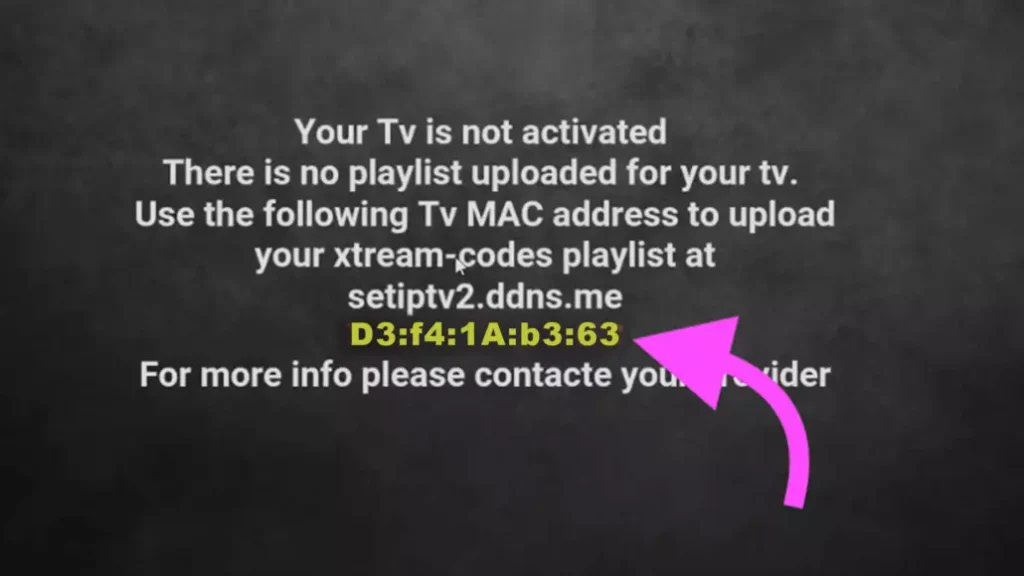
2. Go to the Set IPTV web portal
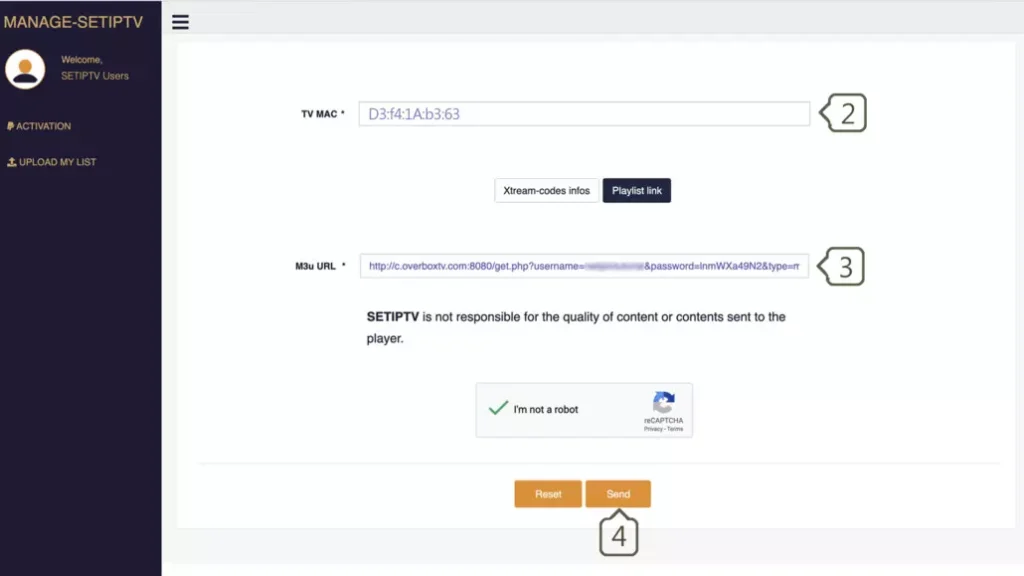
Visit: https://cms.manage-setiptv.com/set.app and select the Playlist link method option.
3. Enter MAC address
Enter your Set-Top Box MAC address in the TV MAC field.
4. Enter M3U link
Enter the M3U link you received from Premium USA IPTV.
5. Click Send
Activate the captcha (I am not a robot) and click Send.
Then restart your TV and open SetIPTV: enjoy hundreds of TV channels, movies, and series via IPTV USA and CANADA.
Method 2: Installation via Xtream codes (recommended)
⏱️ Time: 7 minutes
For this method, you need three pieces of information:
- Server URL (schema, host, and port)
- Username
- Password
You will receive this information from your IPTV provider. With Premium USA IPTV, you always have access to this data.


Set IPTV installation manual – IPTV Netherlands
Overview
SetIPTV is a newly developed IPTV application available for Samsung Smart TVs (Tizen OS) and Android devices (via a direct download link). The developer has also announced that a version for LG Smart TVs (WebOS) will be available soon.
Key features of SetIPTV:
- Eenvoudige installatie van je IPTV Nederland Subscription
- Powerful video encoder
- Support for both M3U and Xtream code connection
ℹ️ Note: Set IPTV biedt een gratis proefperiode van 7 dagen bij de eerste installatie. Daarna moet je een eenmalige activeringsvergoeding van €14,99 betalen via het ontwikkelaarsportaal: cms.manage-setiptv.com/act.app .
Important Download Set IPTV
- For Samsung Smart TV (Tizen): search for Set IPTV in the TV App Store. (image) .
- Voor Android-apparaten: download de app direct via de officiële link: 👉 https://install-iptv.com/setiptv
Installing an IPTV subscription on Set IPTV
Installing an IPTV subscription on Set IPTV
⏱️ Time: 7 minutes
- Find the MAC address

2. Go to the SetIPTV web portal
Visit: https://cms.manage-setiptv.com/set.app and select the Playlist link method option.
3. Enter MAC address
Enter your Set-Top Box MAC address in the TV MAC field.
4. Enter M3U link
Enter the M3U link you received from Premium Nederland IPTV.
5. Click Send
Activate the captcha (I am not a robot) and click Send.
Then restart your TV and open Set IPTV: enjoy hundreds of TV channels, movies, and series via IPTV Netherlands.

Method 2: Installation via Xtream codes (recommended)
⏱️ Time: 7 minutes
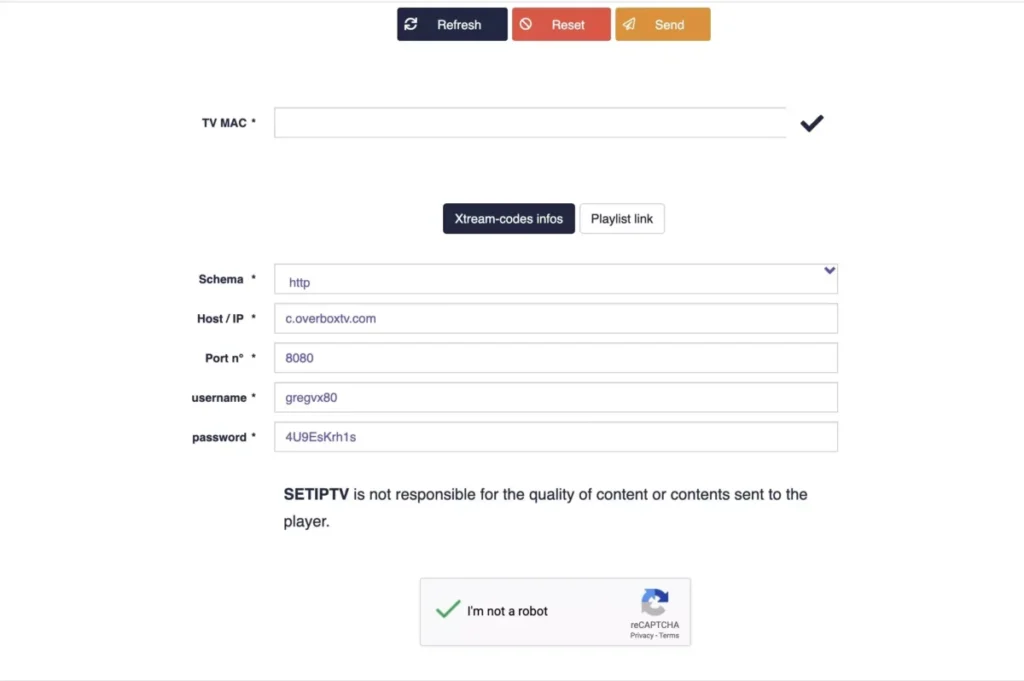
For this method, you need three pieces of information:
- Server URL (schema, host, and port)
- Username
- Password
You will receive this information from your IPTV provider. With Premium Dutch IPTV, you always have access to this data.

1. Find the MAC address
Open the app after installation. You will see your unique MAC address on the screen.
2. Go to the Set IPTV portal
Visit: https://cms.manage-setiptv.com/paneliptv/set.app and select the Xtream codes info method option.
3. Enter MAC address
Enter your Set IPTV MAC address.
4. Enter Xtream codes
Enter the details (server, username, password) that you received through your IPTV subscription in the usa.
5. Click Send
Activate the captcha (I am not a robot) and click Send.
Then restart your TV and open Set IPTV: enjoy the ultimate Premium IPTV experience in the USA and canada.
❓ Frequently asked questions
Where can I find my MAC address?
After installation, your MAC address will appear immediately on the app’s home screen.
My channel list is not loading or is displaying errors?
This can happen with large M3U lists. Reduce the size of your playlist via your IPTV dashboard and upload it again.
How do I delete an expired listing?
Go to: https://siptv.eu/mylist/, enter your MAC address, activate the captcha, and click Delete.
Special offer – Premium Netherlands IPTV
Upgrade your viewing experience with Set IPTV + Premium usa IPTV. Choose your IPTV subscription for the usa today (1, 3, 6, or 12 months) and take advantage of our affordable prices:
✔ Reliable service
✔ 24/7 support
✔ Best IPTV usa experience
If SET IPTV Does Not Work
If the playlist does not load or channels show an error, follow our IPTV not working guide. For stalling or freezing streams, see the IPTV buffering guide.