
Smart IPTV Installation Guide – Best Setup for Smart TV in the USA 2026
Smart IPTV Installation Guide
Overview
If you are living in the United States and looking for the easiest and most reliable way to stream IPTV channels on your Smart TV, then the Smart IPTV installation guide you are reading right now is exactly what you need. The SmartIPTV app — also known as SIPTV — is currently the most popular IPTV player among American Smart TV users, and for very good reasons.
Whether you own a Samsung, LG, Sony, Hisense, or any other Smart TV brand, SmartIPTV works flawlessly across all major platforms available in the USA. With the right IPTV subscription and this step-by-step guide, you will be able to watch thousands of live American and international channels, NFL games, NBA matches, news, movies, and series — all directly on your television screen, without a cable subscription.
In this complete SmartIPTV installation guide, written specifically for users in the United States, you will learn everything from downloading the app to activating it, adding your M3U subscription link, setting up EPG, and fixing the most common issues that American users face with Smart IPTV.
Table of Contents
What is Smart IPTV? {#what-is}
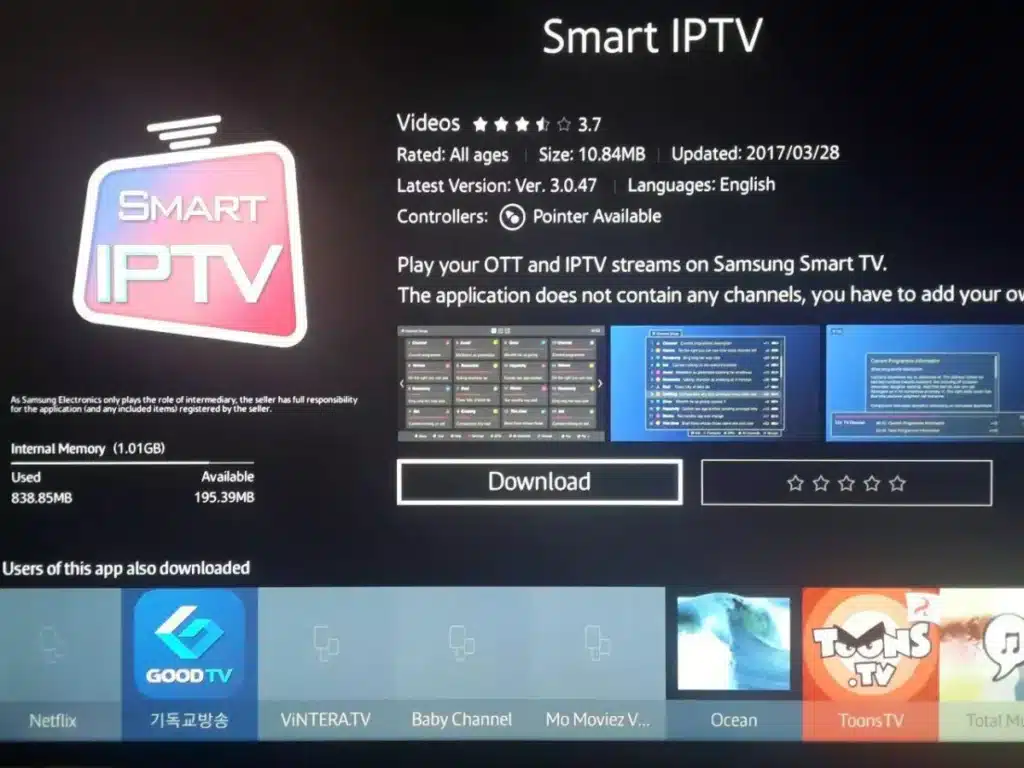
SmartIPTV (SIPTV) is a dedicated media player application built specifically for Smart TVs. It allows users across the United States and worldwide to stream live television channels, on-demand movies, and series through their home internet connection — completely replacing the need for an expensive cable or satellite TV package.
The app works by reading an M3U playlist URL provided by your IPTV subscription service. Once you enter this link through the Smart IPTV web portal, the app automatically fetches your entire channel list and displays it on your TV screen, neatly organized by category — with full EPG (TV guide) support, channel logos, and custom groups.
Smart IPTV was first launched for Samsung Smart TVs and has since expanded to support LG, Sony, Android TV, Amazon Firestick, and more — making it the most versatile and widely available IPTV player for American Smart TV users in 2026.
Why Smart IPTV is the #1 Choice for US Smart TV Users {#why-usa}
American cord-cutters are increasingly turning to IPTV as a cost-effective alternative to traditional cable TV. Among all available IPTV player apps, Smart IPTV consistently ranks as the top choice for US Smart TV users. Here is why:
✅ Native App — No Sideloading Required
Unlike many IPTV players that require sideloading APK files or using workarounds, SmartIPTV is available natively in the Samsung Galaxy Store and LG Content Store — both widely used in American households. Just search and install, no technical skills needed.
✅ Works with All US IPTV Providers
SmartIPTV is fully compatible with all major American IPTV subscription services, including SmartVPro. As long as your provider gives you an M3U link, the app will work perfectly.
✅ Supports American Sports Channels
NFL, NBA, MLB, NHL, MLS — all your favorite American sports leagues are available through SmartIPTV when paired with a premium IPTV subscription like SmartVPro, which carries every major US sports network.
✅ No Monthly App Fee
SmartIPTV charges only a one-time activation fee of €5.49 per TV (approximately $6 USD). There are no recurring monthly charges for the app — making it extremely cost-effective for American households.
✅ 4K & HD Streaming
With a fast US broadband connection and a quality IPTV subscription, SmartIPTV delivers crystal-clear HD and 4K streaming directly on your Smart TV screen.
✅ Save Online Feature
This unique feature stores your IPTV playlist on Smart IPTV’s own servers rather than your TV’s limited RAM — solving one of the most common buffering issues faced by American users with older Smart TVs.
✅ EPG Support for US Channels
SmartIPTV supports Electronic Program Guide (EPG), which gives you a full TV schedule for all your US channels — CNN, ESPN, Fox News, ABC, NBC, CBS, and more — just like a traditional cable TV guide.
Compatible Smart TV Devices in the USA {#devices}
Smart IPTV is compatible with the most popular Smart TV brands sold in the United States:
| Device | App Store | Compatibility |
|---|---|---|
| Samsung Smart TV (2012+) | Samsung Galaxy Store | ✅ Full Support |
| LG Smart TV (2014+) | LG Content Store | ✅ Full Support |
| Sony Android TV | Google Play Store | ✅ Full Support |
| Amazon Firestick / Fire TV | Amazon App Store | ✅ Full Support |
| Android TV Box | Google Play Store | ✅ Full Support |
| Hisense Android TV | Google Play Store | ✅ Full Support |
| TCL Android TV | Google Play Store | ✅ Full Support |
| Philips Android TV | Google Play Store | ✅ Full Support |
Samsung and LG are the two best-selling Smart TV brands in the United States, and both are natively supported by SmartIPTV — which is a major reason for the app’s massive popularity among American users.
Important Notes Before You Start {#notes}
Before beginning this Smart IPTV installation guide, keep these key points in mind:
📌 7-Day Free Trial
Every new SmartIPTV installation comes with a 7-day free trial. During this period, you can fully test the app with your IPTV subscription at zero cost. After 7 days, you need to activate the app for a one-time fee of €5.49 (~$6 USD).
📌 IPTV Subscription Required
Smart IPTV does not include any channels. It is a player only. To watch live TV, sports, movies, or series, you need a separate IPTV subscription from a provider like SmartVPro, which offers 42,000+ live channels and 125,000+ VOD titles, including all major US networks and sports channels.
📌 Internet Speed Requirements
For the best experience streaming IPTV in the USA with SmartIPTV:
- SD quality: 5 Mbps minimum
- HD quality: 10–15 Mbps recommended
- 4K quality: 25 Mbps or higher
📌 One Activation Per TV
Each Smart TV has its own unique MAC address and requires its own Smart IPTV activation. If you have 2 TVs in your American home, you need 2 activations.
Step 1: Download Smart IPTV in the USA {#step1}
Samsung Smart TV (Most Popular in USA):
- Press Home on your Samsung remote
- Go to Apps → Open the Samsung App Store
- Search for “Smart IPTV”
- Click Install and wait for the download to complete
- Open the app from your Samsung home screen
LG Smart TV:
- Press Home on your LG remote
- Open the LG Content Store
- Search for “Smart IPTV”
- Click Install → then Launch
Amazon Firestick (Very Popular in USA):
- Go to Search on your Firestick home screen
- Type “Smart IPTV”
- Select the app and click Get or Download
- Open the app once installed
Sony / Android TV / TCL / Hisense:
- Open the Google Play Store
- Search for “SIPTV” or “Smart IPTV”
- Install and open the app
Once opened, Smart IPTV will display your TV’s MAC address on the welcome screen — which you will need for the next steps.
Step 2: Find Your Smart IPTV MAC Address {#step2}
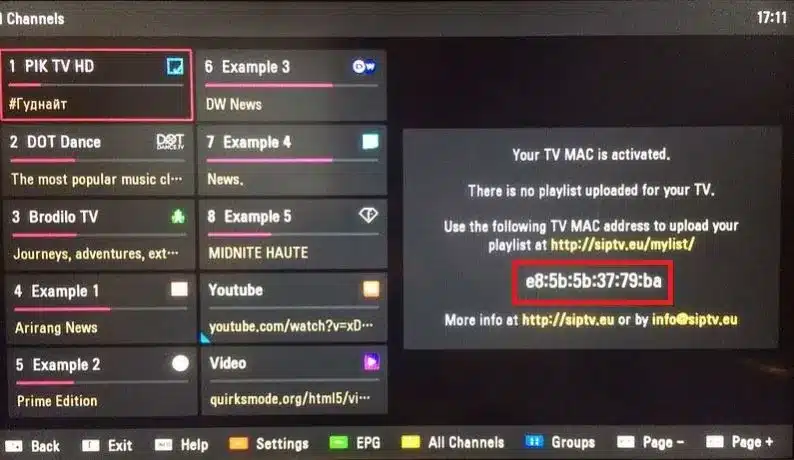
Your MAC address is the unique ID that links your IPTV subscription to your specific Smart TV. When you open SmartIPTV, the MAC address is displayed prominently on the screen.
It looks like this: AA:BB:CC:DD:EE:FF
Write it down or take a photo of it — you will need it in the next steps.
Can’t Find Your MAC Address?
- Press the red button on your remote to open the Smart IPTV settings
- Your MAC ID is listed there
- Make sure to use the MAC address from the SmartIPTV app — NOT from your TV’s general Wi-Fi or network settings, as they can sometimes differ
Step 3: Activate Smart IPTV {#step3}
If your free trial has expired, here’s how to activate SmartIPTV from the USA:
Option A — Activate Online (Recommended for US Users):
- On your phone or laptop, go to siptv.eu/activation
- Enter your TV’s MAC address
- Complete the payment of €5.49 using your US credit/debit card or PayPal
- Restart the Smart IPTV app on your TV — it will be activated instantly
Option B — In-App Payment:
- Open SmartIPTV on your TV
- Follow the on-screen prompts to pay via your TV’s payment system
- The app activates automatically after successful payment
Your activation is permanent for that TV — no renewal, no monthly fees.
Step 4: Add Your M3U IPTV Subscription Link {#step4}
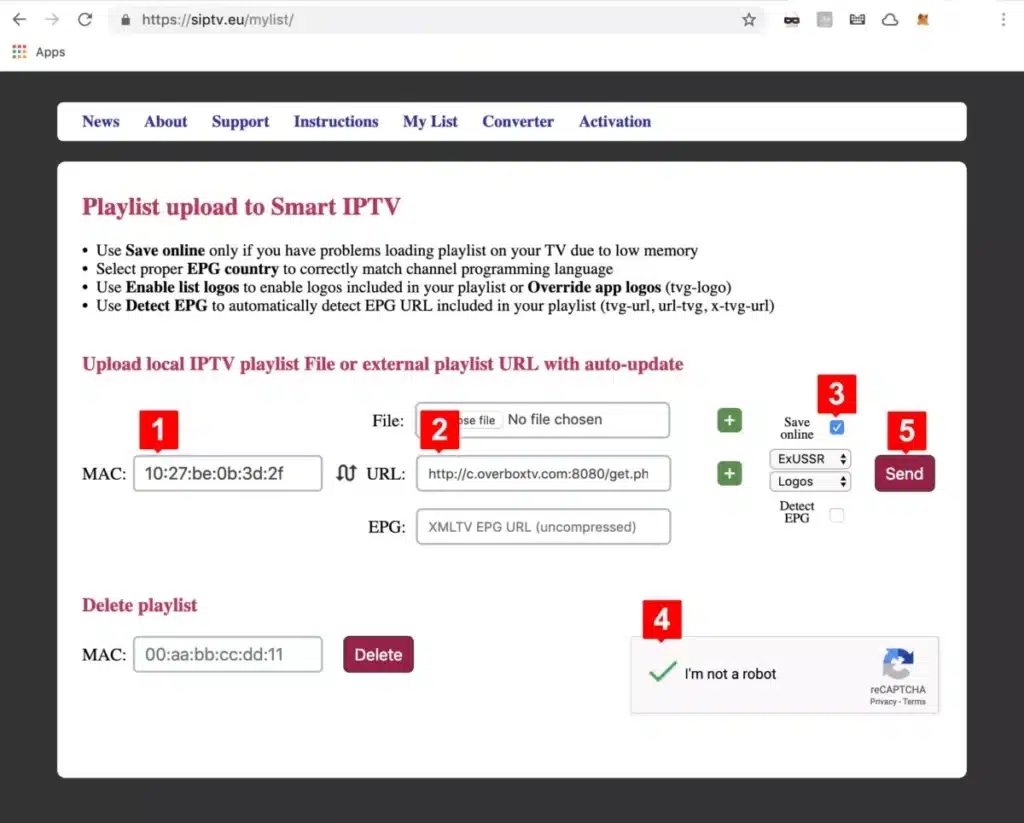
This is the core step of the entire Smart IPTV installation guide. Follow these instructions carefully:
- On your phone or computer, open any web browser
- Navigate to siptv.eu/mylist
- In the MAC field, type your TV’s MAC address exactly (copy it precisely)
- In the M3U URL field, paste the M3U link from your SmartVPro subscription (you received this by email after purchasing)
- Check the “Save online” box — this is highly recommended for American users as it prevents buffering on older TVs
- Solve the captcha (I am not a robot)
- Click Send
Your channel list is now linked to your Smart TV. Open (or restart) the Smart IPTV app on your TV — your full channel list will load automatically within seconds.
You can now browse thousands of US and international channels organized by category: Sports, News, Entertainment, Kids, Movies, Series, and more.
Step 5: Configure EPG, Picons & Channel Groups {#step5}
Maximize your Smart IPTV experience with these additional setup options:
📺 EPG Setup (TV Guide for US Channels)
- Get your EPG URL from your SmartVPro subscription dashboard
- Go to siptv.eu/mylist
- Enter your MAC address and paste the EPG URL in the EPG field
- Save and restart the app
- You will now see a full schedule for channels like ESPN, CNN, Fox Sports, NBC, CBS, ABC, and all other US networks
🖼️ Picons (Channel Logos)
If your M3U file includes logo URLs, Smart IPTV displays them automatically. For US channels, SmartVPro includes Picons for all major American networks — so you’ll see the ESPN logo, CNN logo, Fox logo, etc., next to each channel in the list.
📁 Channel Groups
Your SmartVPro M3U playlist comes pre-organized into groups:
- 🇺🇸 US Channels
- 🏈 Sports (NFL, NBA, MLB, NHL, MLS)
- 🎬 Movies & Series (VOD)
- 📰 News (CNN, Fox News, MSNBC, etc.)
- 👶 Kids
- 🌍 International Channels
Smart IPTV reads these groups automatically and displays them as folders in the app — making navigation easy and fast.
Step 6: Start Watching IPTV on Your Smart TV {#step6}
You are now fully set up! Here’s how to get the most out of Smart IPTV as an American user:
- Browse by category — use the group filter to find US Sports, News, or Entertainment channels instantly
- Open EPG — press the guide button to see what’s currently airing and what’s coming up next
- Search channels — use the search function to find any US channel by name
- Adjust video quality — during playback, use your remote to adjust aspect ratio or zoom
- Favorite channels — mark your most-watched US channels as favorites for quick access
Troubleshooting Common Smart IPTV Issues in the USA {#troubleshooting}
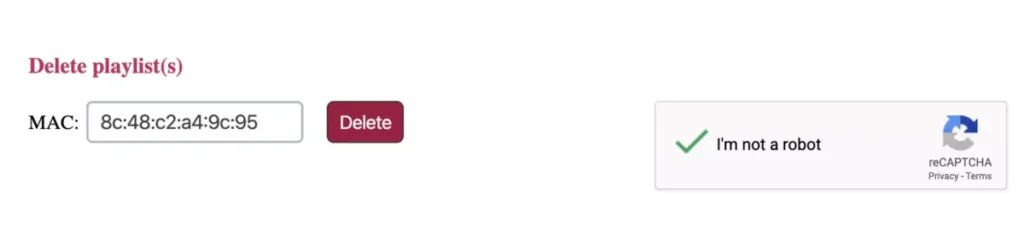
🔴 Issue 1: Channels Not Loading
Why it happens: Expired M3U link or oversized playlist
Fix:
- Visit siptv.eu/mylist and re-enter your M3U link
- Enable “Save online”
- Contact SmartVPro support for a fresh M3U URL
🔴 Issue 2: Buffering on US Sports Channels
Why it happens: Insufficient internet speed or Wi-Fi interference
Fix:
- Run a speed test at fast.com — you need 25+ Mbps for 4K sports
- Switch from Wi-Fi to a wired Ethernet connection
- Restart your router and modem
- Contact SmartVPro — premium US servers handle high-traffic events better
🔴 Issue 3: EPG Not Showing for US Channels
Why it happens: Wrong EPG URL format
Fix:
- Make sure your EPG URL is in XMLTV format
- Re-enter it at siptv.eu/mylist
- Allow 10–15 minutes after saving for the guide to populate
🔴 Issue 4: Smart IPTV Showing “Not Activated”
Why it happens: Free trial expired
Fix:
- Go to siptv.eu/activation and pay €5.49 with your US card
🔴 Issue 5: Channel List Disappeared After TV Update
Why it happens: TV firmware update may reset the app
Fix:
- Simply go back to siptv.eu/mylist and re-enter your MAC and M3U link
🔴 Issue 6: Wrong Channels Showing (Not US Channels)
Why it happens: Wrong M3U link entered, or provider issue
Fix:
- Verify your M3U link with SmartVPro
- Make sure you’re using the USA-specific M3U link from your subscription
Smart IPTV vs Other IPTV Players – USA Comparison {#comparison}
| Feature | Smart IPTV | IPTV Smarters | TiviMate | GSE Smart IPTV |
|---|---|---|---|---|
| Available on Samsung (USA) | ✅ Yes | ❌ No | ❌ No | ❌ No |
| Available on LG (USA) | ✅ Yes | ❌ No | ❌ No | ❌ No |
| No Sideloading Needed | ✅ Yes | ❌ No | ❌ No | ⚠️ Partial |
| EPG for US Channels | ✅ Yes | ✅ Yes | ✅ Yes | ✅ Yes |
| Save Online Feature | ✅ Yes | ❌ No | ❌ No | ❌ No |
| US Sports Support | ✅ Yes | ✅ Yes | ✅ Yes | ✅ Yes |
| One-Time Cost | €5.49 | Free | $4.99/yr | Free |
| Ease of Use (USA) | ⭐⭐⭐⭐⭐ | ⭐⭐⭐⭐ | ⭐⭐⭐ | ⭐⭐⭐ |
Smart IPTV wins for Samsung and LG users — the two most popular Smart TV brands in the United States.
Best IPTV Subscription for Smart IPTV in the USA {#subscription}
To get the full Smart IPTV experience in the USA, you need a premium, US-focused IPTV subscription. We strongly recommend SmartVPro — the #1 rated IPTV provider in the United States.
🏆 Why SmartVPro is the Best IPTV for USA Smart TV Users:
- 🇺🇸 42,000+ live channels including every major US network
- 🏈 All US sports — NFL, NBA, MLB, NHL, MLS, UFC, NASCAR, and more
- 🎬 125,000+ VOD — movies and series in HD, 4K & 8K
- ⚡ Ultra-fast US servers with 99.9% uptime
- 📱 Multi-device — Smart TV, phone, tablet, laptop, PC
- 🕐 Instant activation — your M3U link is delivered within minutes
- 💬 24/7 US support via WhatsApp and email
- ✅ 100% compatible with Smart IPTV, IPTV Smarters, TiviMate
👉 Get Your SmartVPro USA IPTV Subscription Now
Frequently Asked Questions {#faq}
❓ Is Smart IPTV available in the USA?
Yes. Smart IPTV is fully available in the United States on Samsung, LG, Android TV, Firestick, and other Smart TV platforms.
❓ What is the best IPTV subscription for Smart IPTV in the USA?
SmartVPro is the top-rated IPTV provider for US users — offering 42,000+ channels, all major US sports, and 125,000+ VOD titles, fully compatible with Smart IPTV.
❓ How much does Smart IPTV cost in the USA?
Smart IPTV offers a 7-day free trial. After that, the one-time activation is €5.49 (~$6 USD) per TV. Your IPTV content subscription (like SmartVPro) is separate.
❓ Can I watch NFL and NBA on Smart IPTV?
Absolutely. With a SmartVPro subscription connected to Smart IPTV, you can watch every NFL, NBA, MLB, NHL, and MLS game live in HD and 4K.
❓ Does Smart IPTV work on Samsung TVs sold in the USA?
Yes. Smart IPTV is available in the Samsung Galaxy Store in the USA and works perfectly on all Samsung Smart TVs from 2012 onwards.
❓ How do I add my US IPTV subscription to Smart IPTV?
Go to siptv.eu/mylist, enter your TV’s MAC address and your M3U link from SmartVPro, enable “Save online,” and click Send. Your channels will load instantly.
❓ Is Smart IPTV legal in the USA?
Smart IPTV as an app is completely legal. It is simply a media player. Always ensure your IPTV content subscription complies with US copyright laws.
❓ Why is my Smart IPTV buffering during NFL games?
Large live events like NFL require higher bandwidth. Make sure your internet speed is at least 25 Mbps, use Ethernet instead of Wi-Fi, and use a premium provider like SmartVPro which has dedicated US sports servers.
Smart IPTV Not Loading?
Seeing a blank channel list or an error after uploading your playlist? Use our IPTV not working guide. For freezing or stalling playback, see how to stop IPTV buffering, and compare other TV apps in the player app guide by device.