
DEIPTV Explained: What It Means and a Complete Guide to IPTV Services (2026)
DEIPTV is a term people type into Google when they are looking for an IPTV subscription, and it is worth being clear about what it is and what it is not before you spend money. In search, DEIPTV behaves as a brand-style name used by a number of unrelated IPTV seller websites, not as an industry standard or a shorthand for IPTV in Germany. SmartVPro is not DEIPTV and does not sell it.
This guide explains what the term means in practice, how IPTV actually works, what a subscription usually includes, which devices and apps to use, how M3U and Xtream Codes logins differ, what internet speed you need, why streams buffer, where the law stands, and how to judge any IPTV service, including ours, before you pay.
Key facts
- What DEIPTV is: a name used by several independent IPTV seller sites; it is not a technology, a standard or a licensed broadcaster
- What IPTV is: live channels and on-demand video delivered over your internet connection to a player app on a TV, stick, box, phone or computer
- Two separate parts: the subscription (your login and the content) and the player app (what displays it)
- Internet: about 5–8 Mbps per HD stream and 25 Mbps for 4K, per device, with a stable connection mattering more than headline speed
- Legal position: the technology is legal; whether a specific service is lawful depends on the rights it holds to the content it streams
- Before you buy: test on your own TV at peak time, check the refund policy, and confirm the channels you actually watch are there
Table of Contents
What is DEIPTV?
DEIPTV is a name that appears on several independent websites selling IPTV subscriptions, each presenting “DEIPTV” as its own brand. It is not a technology, a standard or a broadcaster. When you search for it, you are effectively searching for one of those seller sites, so the sensible response is to treat DEIPTV as a generic IPTV subscription and evaluate it with the same checks you would apply to any provider.
Three things follow from that. First, the sites using the DEIPTV name are not connected to each other, so a review of one tells you nothing about another. Second, the channel counts and “zero buffering” promises on those pages are marketing claims, not something you can verify before you pay. Third, the letters “DE” do not appear to indicate Germany; the DEIPTV sites we looked at are in English, price in US dollars and advertise to a worldwide audience. We cover the Germany question in its own section below.
To be equally clear about us: SmartVPro is an IPTV subscription service focused on viewers in the USA and Canada. We are not DEIPTV, we do not resell it, and nothing on this page should be read as a review of any DEIPTV-branded site. What we can do is explain how IPTV works and how to judge any service, which is what the rest of this guide does.
How does IPTV work?
IPTV (Internet Protocol Television) delivers live channels and on-demand video as data over your internet connection, instead of as a broadcast signal through a cable, dish or aerial. Six pieces work together: a provider running the streams, your internet connection, a player app, a login or playlist, the delivery of the stream itself, and the live TV or on-demand content that plays on your screen.
- IPTV provider or service. Encodes each channel into a video stream and hosts it on servers built to serve many viewers at once. Capacity at peak time is where good and bad providers separate.
- Internet connection. Cable, fibre, DSL, 5G home internet or fixed wireless. The provider does not matter; stability does.
- IPTV player or app. Software on your TV, stick, box, phone or computer that reads your login and turns it into a channel list, a guide and a video window. The app contains no channels of its own.
- Login credentials or playlist. Either an M3U playlist link or an Xtream Codes login (server address, username, password). This is what your subscription actually gives you.
- Stream delivery. When you pick a channel, the app requests it from the provider’s server, buffers a few seconds ahead and plays it.
- Live TV and VOD. Live channels arrive as a continuous feed; on-demand titles are stored files you can start, pause and resume.
The one distinction that prevents most beginner confusion: the subscription and the player app are separate products. You can swap the app, upgrade the device or change providers without touching the other pieces.
What does an IPTV subscription include?
Depending on the provider, an IPTV subscription usually includes live channels, a programme guide (EPG), a library of movies and series (VOD), sports channels and events, international channels in several languages, and sometimes catch-up on selected channels. The depth of each varies enormously, and no provider offers everything, so compare component by component rather than by headline channel count.
| Component | What it usually means | Worth checking |
|---|---|---|
| Live channels | US, Canadian, UK and international channels streamed in real time | Are the specific channels you watch present, stable and in HD? |
| EPG | The on-screen guide showing what is on now and next | Is it populated for your channels and set to your time zone? |
| Movies and series (VOD) | On-demand titles you can start at any time | Is it organized and searchable, or a raw list? |
| Sports | League packages, regional sports networks, PPV events | Does the provider add capacity on big nights, or do streams degrade? |
| International and multi-language | Channel packs by country and language | Are the languages your household needs included? |
| Catch-up | Replay of recent broadcasts on supported channels | Which channels, and for how many days? Not every provider offers it. |
| Connections | How many devices can stream at the same time | Does the plan match the number of TVs in your home? |
For an example of how a line-up can be organized so you can actually find things, see our IPTV channel list and the guide to American channels on IPTV.
Is DEIPTV about IPTV in Germany?
Not as far as we can tell. “DE” is the country code for Germany, which is why some people assume DEIPTV means “IPTV Deutschland”, but the DEIPTV-branded seller sites are written in English, quote prices in US dollars and target viewers worldwide. If you are actually looking for German-language television, search for the channels you want rather than the DEIPTV name, and check any provider’s channel list for German public and private broadcasters before subscribing.
The practical considerations for a viewer in Germany are the same as anywhere else, with two additions: confirm the German channels and the German-language EPG are included, and remember that the legal position of a service is judged under the law of the country you watch in. Everything else in this guide, from devices to buffering, applies in Germany exactly as it does in the United States.
If what you are really looking for is a working service for viewers in Germany rather than terminology, see our dedicated IPTV Germany page — it covers German-language channels, devices, pricing and setup in one place.
Which devices support IPTV?
IPTV runs on almost any device that can install an app: Samsung and LG smart TVs, Android TV and Google TV, Amazon Fire TV and Firestick, Apple TV, Roku (with limits), Android phones and tablets, iPhone and iPad, Windows and Mac computers, and dedicated set-top boxes such as MAG and Formuler. The best device is usually the one already connected to your main TV, provided it is recent enough to decode HD video smoothly.
| Device | How it runs IPTV | Notes |
|---|---|---|
| Samsung Smart TV (Tizen) | Player app from the Samsung store | No extra hardware; older models may lack the app you want |
| LG Smart TV (webOS) | Player app from the LG Content Store | Use 5 GHz Wi-Fi or Ethernet for HD sports |
| Android TV / Google TV | Apps from Google Play, including TiviMate | The most flexible platform for IPTV |
| Fire TV / Firestick | Apps from the Amazon store or sideloaded | Most popular route in the US; a 4K model copes better on busy nights. See our Firestick IPTV guide. |
| Apple TV, iPhone, iPad | Apps from the App Store | Fewer app choices, but the main players are well maintained |
| Roku | Limited: a few players via casting or specific channels | Roku restricts third-party IPTV players; do not buy a Roku specifically for IPTV |
| Android phones and tablets | Apps from Google Play | Good for viewing on the go or casting to a TV |
| Windows and Mac | Desktop players or a web player | Useful for testing a login quickly |
| MAG and Formuler boxes | Built-in portal using a portal URL | Dedicated boxes; see the Formuler Z7 setup manual |
Screen-by-screen instructions for every platform above are in the IPTV installation guide.
IPTV apps and players
An IPTV player is the app that displays your subscription; it is normally a separate product from the subscription itself, made by an independent developer, and it contains no channels. Any player that accepts an M3U playlist or Xtream Codes login will work with most subscriptions, so the choice comes down to your device and the guide layout you prefer. SmartVPro does not own or develop any of the apps named here.
- Full-featured TV players such as TiviMate on Android TV and Fire TV: polished guide, favourites, multi-view, recording. Usually the best big-screen experience.
- Cross-platform players such as IPTV Smarters, IBO Player Pro, Smart IPTV and XCIPTV: available on smart TVs, Fire TV, Android, iOS and desktop, so one app can cover every screen in the house. Feature sets differ between platforms.
- Generic media players such as VLC: play an M3U stream but offer little in the way of a guide or on-demand browsing.
- Portal-based boxes such as MAG and Formuler: their own built-in interface instead of a downloadable app.
No single app is perfect on every device. If a player misbehaves, try another before blaming the subscription; our guides to Hot Player and Smart IPTV walk through two common alternatives.
M3U vs Xtream Codes
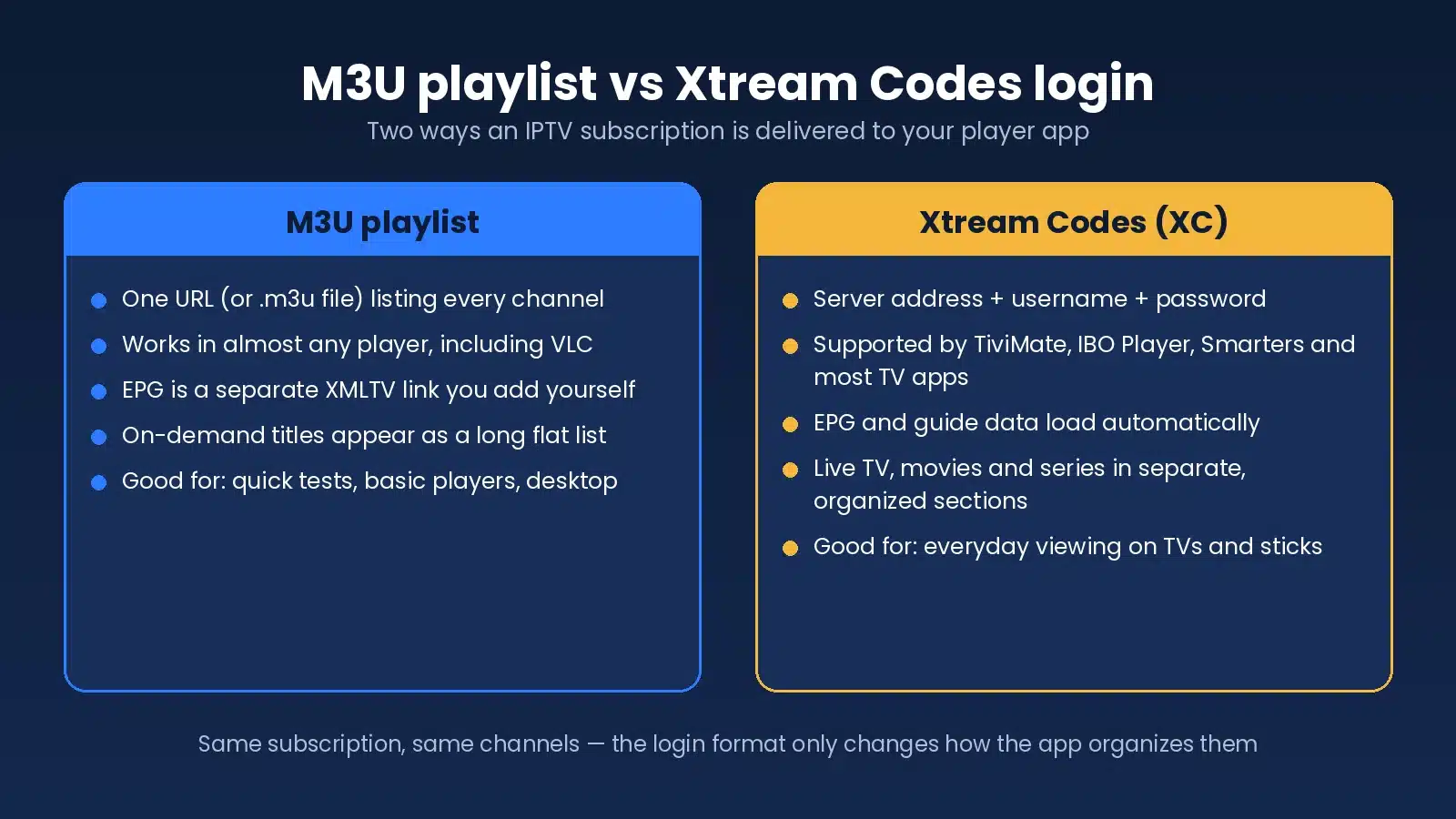
M3U and Xtream Codes are the two common formats in which an IPTV login is delivered. An M3U is a single playlist URL listing every channel; Xtream Codes is a server address, username and password that the app uses to load live TV, the guide and on-demand separately. They give access to the same subscription; the difference is in setup, organization and EPG handling.
| Feature | M3U playlist | Xtream Codes |
|---|---|---|
| Setup | Paste one URL (or load a .m3u file) | Enter server URL, username and password |
| Credentials | Embedded in the URL | Separate fields; easier to re-enter on a new device |
| Organization | One flat list; groups depend on the playlist | Live, movies and series in separate sections with categories |
| EPG | Add an XMLTV guide link manually | Loads automatically from the server |
| App compatibility | Works in almost any player, including VLC | Supported by most modern TV players; not by generic media players |
| Best for | Quick tests, desktop, basic players | Everyday viewing on TVs, sticks and boxes |
Internet speed for IPTV
As a practical guide, allow about 3–4 Mbps per standard-definition stream, 5–8 Mbps for HD and 25 Mbps for 4K, for each device streaming at the same time. Those figures match the FCC Broadband Speed Guide for video streaming, and most home connections clear them easily. Speed alone does not guarantee a smooth picture, though.
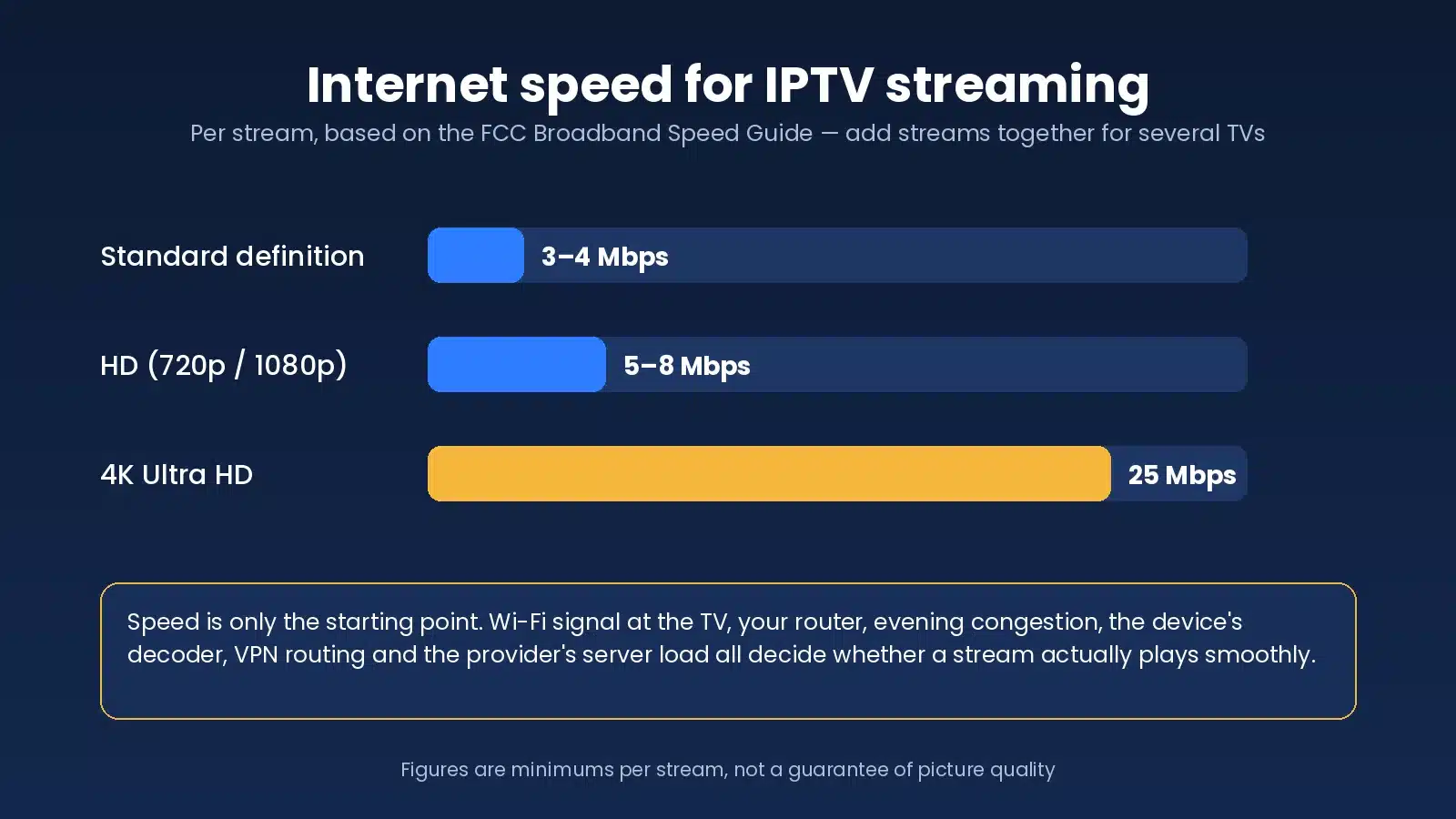
Real performance also depends on the Wi-Fi signal at the TV rather than at the router, the age and quality of your router, congestion on your street or building in the evening, the decoding power of the device, the provider’s server load, the route your ISP takes to the provider’s servers, and, if you use one, the route your VPN adds on top. A 500 Mbps plan delivering 10 Mbps through two walls to a 2.4 GHz TV will buffer; a 50 Mbps plan on Ethernet usually will not.
Why does IPTV buffer?
IPTV buffers when the next few seconds of video do not arrive before the player needs them. The usual causes, roughly in order of likelihood, are weak Wi-Fi at the TV, a congested home network, a device that cannot decode the stream, a player app problem or full cache, VPN routing, ISP routing, a problem with one channel’s source, or a provider server under load. None of these is automatically the fault of your ISP or the service; troubleshooting is about finding out which one it is.
- Restart the player and the device. A full power-off, not just sleep.
- Restart the router. Wait a minute before powering it back on.
- Test on wired Ethernet. If buffering vanishes on a cable, the problem is Wi-Fi; a mesh node or 5 GHz connection will fix it.
- Test another app. Players handle buffering differently; a larger buffer setting smooths out small dips.
- Test one channel against all channels. One channel freezing while others play points to a source issue for the provider to fix; everything freezing points to your network or the servers.
- Test with the VPN on and off. Some VPN routes add enough latency to break live video; a nearby server often solves it. Our guide to using a VPN with IPTV explains when one helps and when it hurts.
- Test another device. If a phone on the same Wi-Fi plays the channel smoothly, the TV or stick is the weak link.
- Contact support with exact symptoms. Channel, time, device, Wi-Fi or Ethernet, and what you have already tried.
The step-by-step version, with device-specific settings, is in how to fix IPTV buffering.
Is IPTV legal?
IPTV as a technology is legal. It is simply a way of delivering television over the internet, and cable and telecom companies use it for their own TV products. Whether a particular IPTV service is lawful is a separate question that depends on whether it holds the rights and licences to distribute the content it offers, and the answer can differ from one service to the next, including between sites that share a name such as DEIPTV.
In the United States, copyright law protects broadcasters and rights holders, and distributing their content without permission is unlawful; the U.S. Copyright Office explains the basic definitions. Enforcement has focused on operators and sellers of unauthorized services rather than viewers, but that does not make a service lawful simply because you paid for it.
In Germany and the rest of the EU, the same principle applies under national copyright law and EU directives, and the position is judged in the country where you watch. Signs of a provider that takes rights seriously include published terms, a copyright and DMCA policy it acts on, identifiable contact details and a refund policy. Ours are on the DMCA and copyright policy page.
This is general information rather than legal advice. If you are unsure about a specific service, read its terms and ask a lawyer. Our separate guide to whether IPTV is legal in the USA goes into more detail.
What should you check before choosing an IPTV service?
Whether the service calls itself DEIPTV, SmartVPro or anything else, the same ten checks apply. Run through them in order and expect a service to pass all of them before you commit to more than a month.
- Device compatibility. Does it work in a standard player on the TV or stick you already own?
- Channel relevance. Are the channels your household actually watches present, in HD and easy to find?
- Trial availability. Can you test on the same servers as paying customers before buying?
- EPG. Does the guide show the right programme, right now, in your time zone?
- Support. Send a real question and time the reply.
- Stream stability. Watch between 7 p.m. and 11 p.m. on a game night; peak-time stability predicts long-term satisfaction better than anything else.
- VOD availability. Search for three titles you would genuinely watch and check they play.
- Simultaneous connection limits. Does the plan cover the number of TVs in your home?
- Refund terms. Is there a written refund policy you could actually use?
- Clear pricing. Prices in your currency, with connection counts and renewal terms stated up front.
The long version of this checklist, with the red flags that should disqualify a provider outright, is in how to choose an IPTV provider.
IPTV vs cable or satellite TV
| Feature | IPTV | Cable / satellite |
|---|---|---|
| Delivery method | Streamed over your internet connection | Coaxial cable or satellite dish, separate from your internet |
| Internet dependency | Entirely dependent on your connection and home Wi-Fi | Works during an internet outage |
| Device flexibility | Smart TV, stick, box, phone, tablet, computer; one login, many screens | Provider’s set-top box, usually one per TV, often rented |
| Installation | Install an app and enter a login | Technician visit or self-install kit; dish needs line of sight |
| On-demand options | Large VOD library included; catch-up where offered | On-demand store, often pay-per-title; built-in DVR |
| Portability | Works anywhere with internet | Tied to the installed address |
| Channel organization | Set by the provider and the app; favourites and custom lists are easy | Fixed numbering; local channels guaranteed |
| Contract | Usually monthly to yearly, no long-term contract | Often a one- or two-year term plus equipment fees |
Cable and satellite still win on simplicity and on guaranteed local channels; IPTV wins on price, breadth and flexibility. Which matters more depends on how your household watches.
IPTV pricing
IPTV pricing depends on subscription length, the number of simultaneous connections, the content package and the level of support. Longer terms cost less per month, and extra connections add a few dollars each. As a concrete reference, SmartVPro’s current prices in US dollars are:
| Plan length | 1 connection | 2 connections | 3 connections |
|---|---|---|---|
| 1 month | $14.99 | $25.99 | $35.99 |
| 3 months | $29.99 | $46.99 | $71.99 |
| 6 months | $39.99 | $69.99 | $95.99 |
| 12 months | $64.99 | $117.99 | $155.99 |
Current plans and connection options are on the IPTV subscription plans page, and a wider look at what the market charges is in our guide to IPTV subscription prices. Very low prices from any seller usually indicate a reseller with no control over server capacity, which shows up as evening buffering.
Can you test IPTV before buying?
You should. A short trial on the same servers as paying customers lets you confirm that the app works on your device, that the channels you care about load, that on-demand titles play, that the guide is populated, and that streams stay stable at peak time on your own network. SmartVPro offers a 24-hour paid trial for $2 on request: contact us on WhatsApp or by email through the support page and test it in the evening on the TV you will actually use.
How to start using IPTV
- Select a compatible device. The smart TV, stick or box already attached to your main screen is usually fine.
- Install a compatible IPTV player. From your device’s app store; see the installation tutorials if you are unsure which.
- Choose your IPTV plan. Start with a short term or a trial; the IPTV subscription options list every plan.
- Receive your credentials. An M3U link or an Xtream Codes login arrives after activation.
- Add the credentials to the player. Enter them exactly as supplied.
- Load channels and VOD. The first load can take a minute while the guide downloads.
- Test playback and adjust. Play a live channel, a sports channel and one on-demand title; switch to Ethernet or 5 GHz and raise the buffer if needed.
DEIPTV FAQ
What is DEIPTV?
DEIPTV is a brand-style name used by several unrelated websites that sell IPTV subscriptions. It is not a technology, a standard or a broadcaster. Treat any DEIPTV-branded service as a generic IPTV subscription and judge it on device support, channels, peak-time stability, support and refund terms.
Is DEIPTV the same as IPTV Germany?
Not from what we can see. Although DE is the country code for Germany, the DEIPTV seller sites are in English, price in US dollars and target viewers worldwide. If you want German channels, check a provider’s channel list for them rather than relying on the name.
Is SmartVPro DEIPTV?
No. SmartVPro is a separate IPTV subscription service for viewers in the USA and Canada. We do not sell or resell DEIPTV, and this guide is not a review of any DEIPTV-branded site.
How does IPTV work?
A provider encodes channels into video streams and hosts them on servers. Your subscription gives you a login; a player app on your TV or device uses that login to load a channel guide and request each stream over your internet connection. The subscription and the app are separate products.
Which IPTV app should I use?
On Android TV or Fire TV, TiviMate is the most polished choice. For one app across smart TVs, sticks, phones and desktop, IPTV Smarters, IBO Player Pro or XCIPTV are common. Any player that accepts an M3U or Xtream Codes login will work with most subscriptions.
Does IPTV work on a smart TV or a Firestick?
Yes. Samsung and LG smart TVs install player apps from their own stores, and the Amazon Firestick runs players such as TiviMate and IPTV Smarters. If a TV is too old for the app you want, a Firestick in an HDMI port is the usual workaround.
What internet speed is needed for IPTV?
About 3–4 Mbps per SD stream, 5–8 Mbps for HD and 25 Mbps for 4K, per device streaming at once. Stability, Wi-Fi quality at the TV and evening congestion matter more than the headline speed of your plan.
Why does IPTV buffer?
The next seconds of video did not arrive in time. Common causes are weak Wi-Fi, a congested network, an underpowered device, a full app cache, VPN or ISP routing, a single channel’s source, or a provider server under load. Restart the device and router, test on Ethernet, then narrow it down.
What is the difference between M3U and Xtream Codes?
An M3U is a single playlist URL that lists every channel and works in almost any player. Xtream Codes is a server address, username and password that lets the app load live TV, the guide and on-demand separately, with the EPG filled in automatically. Both give access to the same subscription.
Can IPTV work on multiple devices?
You can usually install the app and login on several devices, but the number that can stream at the same moment is set by the connections in your plan. One connection means one device at a time; two TVs at once needs a two-connection plan.
Is IPTV legal?
The technology is legal. Whether a specific service is lawful depends on whether it holds the rights to the content it streams, judged under the law of the country you watch in. Look for published terms, a copyright policy and real contact details, and ask a lawyer if you are unsure.
Can I test an IPTV service first?
Yes, and you should. Ask for a trial on the same servers as paying customers, run it in the evening on the TV you will actually use, and check live channels, on-demand, the guide and stability before paying for a longer plan.
Final thoughts on DEIPTV
DEIPTV is a name, not a guarantee. Behind it are ordinary IPTV subscriptions from sellers that are not connected to each other or to us, so the only sensible way to judge one is the way you would judge any provider: does it work on your device, carry your channels, hold up at 8 p.m. on a game night, show the right guide, answer support, publish its terms and refund policy, and price clearly. Test before you commit to more than a month. If you would like to run that test with SmartVPro, the subscription plans and the trial request page are the two places to start.