
IPTV Smarters Pro Setup Guide for USA: Firestick, Android, iOS & TV
Quick answer: IPTV Smarters Pro is a free IPTV player app for Fire TV Stick, Android, iPhone, iPad, Apple TV, Windows, macOS and some Smart TVs. It does not include any channels; you add the login (username, password and server URL, or an M3U link) from an IPTV provider such as SmartVPro. Setup takes about five minutes: install the app, choose “Login with Xtream Codes API”, enter the details, wait for the channels and EPG to load, then set the player to ExoPlayer for the smoothest playback in the USA.
Table of Contents
IPTV Smarters Pro is only the player; the service behind it is explained in our article on what IPTV is.
What IPTV Smarters Pro is and what it is not
IPTV Smarters Pro is one of the most downloaded IPTV players in the United States. It is a player, like a web browser: (the IPTV article on Wikipedia explains the technology) it displays live TV, movies, series and a program guide from whatever provider you log in with. The IPTV Smarters Pro app is free and is made by WHMCS Smarters, not by any IPTV provider. That matters for two reasons: first, downloading IPTV Smarters Pro gives you no channels until you add a subscription; second, problems with channels are almost always on the provider side, while problems with the interface, playback engine or login screen are on the app side.
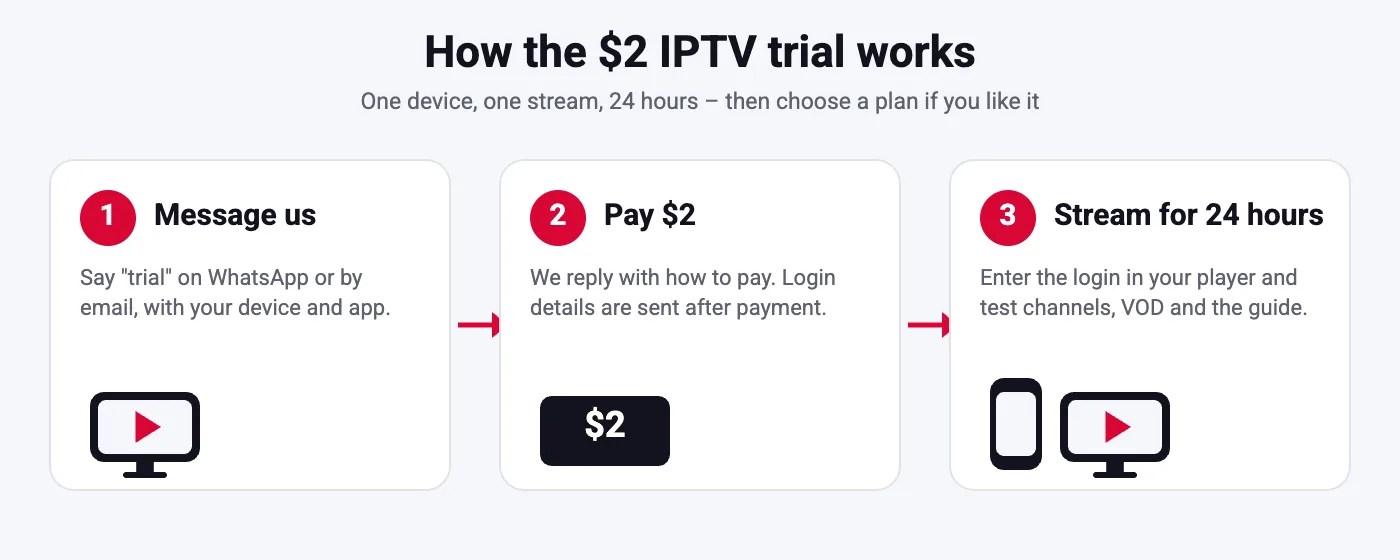
The app supports Xtream Codes logins, M3U playlists, EPG, catch-up, multi-screen (up to four streams in one window), parental controls and external players such as VLC or MX Player. SmartVPro subscriptions work with IPTV Smarters Pro on every platform listed below; the login arrives by WhatsApp or email after you order a plan or the $2 trial.
Which devices run IPTV Smarters Pro
| Device | Where to get it | Notes |
|---|---|---|
| Fire TV Stick, Fire TV Cube | Sideload the APK with Downloader | Most popular setup in the USA |
| Android TV, Google TV, Android boxes | Google Play or APK | Best playback with ExoPlayer |
| Android phones and tablets | Google Play | Same login as the TV |
| iPhone, iPad | App Store (IPTV Smarters Player) | Name differs slightly in the App Store |
| Apple TV | App Store | Use a wired connection for 4K |
| Windows and macOS | Developer website | Handy for a quick test |
| Samsung and LG Smart TVs | Samsung Store / LG Content Store (availability varies) | If missing, use IBO Player or Smart IPTV |
Not sure which device to use? Our player installation tutorial compares the options, and the Firestick guide explains why the Fire TV Stick 4K is the most common choice for US viewers.
Step 1: get your IPTV login
Before installing anything, make sure you have the three items IPTV Smarters Pro asks for: server URL (including http:// and the port, for example :8080 if your provider uses one), username and password. Some providers send an M3U link instead; IPTV Smarters Pro accepts that too, but the Xtream Codes login is better because it loads the EPG and catch-up automatically. SmartVPro sends Xtream Codes details within minutes of payment; the $2 24-hour trial is the fastest way to get a login for testing on one device.
Step 2: install IPTV Smarters Pro on Fire TV Stick
- On the Fire TV Stick go to Settings, My Fire TV, Developer Options and enable “Apps from Unknown Sources” (on newer sticks, enable it per app for Downloader).
- Install the free Downloader app from the Amazon Appstore.
- Open Downloader and enter the APK address from the IPTV Smarters developer site, then install the APK.
- Open IPTV Smarters Pro, accept the terms and choose Login with Xtream Codes API.
- Enter any name, your username, password and the server URL, then tap Add User. Wait while channels, movies and series download; this can take a minute on a large lineup.
Typing in IPTV Smarters Pro with a Fire TV remote is slow and error-prone; use the Amazon Fire TV app on your phone as a keyboard. A mistyped server URL is the number one cause of the IPTV Smarters failed to authorize error.
Step 3: install on Android TV, phones and tablets
Search for IPTV Smarters Pro in Google Play and install it, or sideload the APK if your box has no Play Store. Open the app, choose Login with Xtream Codes API, enter the details and add the user. On Android TV boxes, allow the app to run in the background and exclude it from battery optimization so the EPG keeps refreshing. If the Play Store version is missing in your region, the developer APK works on any Android 5.0 or newer device.
Step 4: install on iPhone, iPad and Apple TV
On the App Store the app is listed as IPTV Smarters Player (the Pro name is used on Android). Install it, open IPTV Smarters Pro, choose Xtream Codes API, enter the server URL, username and password and add the user. Apple TV uses the same account; for 4K channels connect the Apple TV with an Ethernet cable where possible. Apple devices are strict about certificates, so if your provider uses an https URL and the login fails, check that the date and time are set automatically.
Step 5: install on Samsung and LG Smart TVs
IPTV Smarters Pro is available in some Samsung and LG app stores but not all regions. If you cannot find it, do not install random lookalike apps. Use Smart IPTV, IBO Player or SET IPTV instead; they accept the same SmartVPro login via an M3U link and are covered in our Smart IPTV installation guide. Alternatively, plug a Fire TV Stick into the TV and follow Step 2; it is cheaper than a new TV and gives you the full IPTV Smarters Pro experience.
Step 6: the settings that make IPTV Smarters Pro run smoothly
- Player: Settings, Player Settings. Set Live TV, Movies and Series to ExoPlayer; the native player is less stable on US sports streams. On weak devices try the hardware decoder.
- Stream format: leave on default (ts) for most providers; switch to m3u8 (HLS) only if streams fail to start.
- EPG: Settings, EPG, install or refresh. If the guide shows nothing, set the time shift for your US time zone and refresh again.
- Auto start and auto update: enable automatic playlist updates so new channels appear without re-adding the user.
- Parental control: set a PIN and lock categories you do not want shown.
- External player: optional. Install VLC or MX Player and choose it under External Players if a specific stream stutters in ExoPlayer.
Using the guide, catch-up, recording and multi-screen
Once the channels are loaded in IPTV Smarters Pro, Live TV shows categories on the left and channels in the middle; press the EPG button to open the guide with a timeline. Channels with a clock icon support catch-up: open the channel, choose Catch Up and pick the day and program.
Recording in IPTV Smarters Pro is available on Android devices with storage permission; recordings are saved locally. Multi-screen lets you watch up to four channels at once, useful for Sunday sports, but each stream counts as a connection on your plan, so a 1-connection account can only play one at a time. Movies and Series use the same login and show posters, trailers and a resume function.
Common IPTV Smarters Pro problems and quick fixes
| Problem | Quick fix |
|---|---|
| Failed to authorize | Re-enter login exactly, check plan expiry, close other devices, disable VPN. Full guide: failed to authorize fixes |
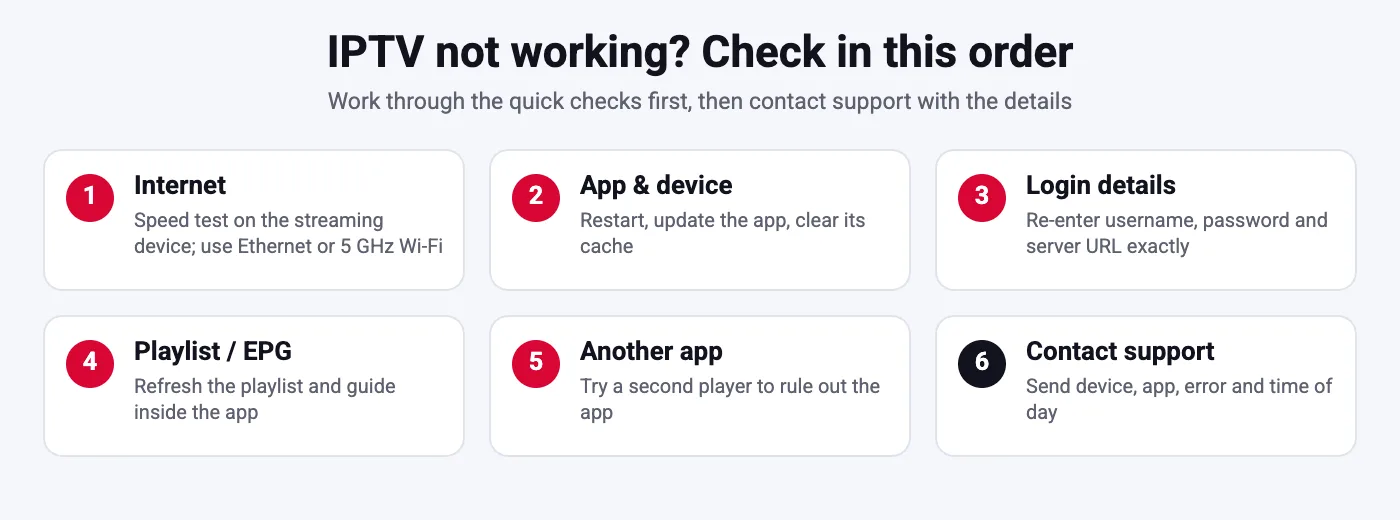
| Channels load but do not play | Switch player to ExoPlayer, try m3u8 format, test on Ethernet or 5 GHz Wi-Fi |
| Buffering every few seconds | Network, not the app: see IPTV buffering fix |
| EPG empty | Settings, EPG, refresh; set time shift; wait a few minutes |
| Black screen with sound | Change decoder from hardware to software or vice versa |
| App crashes on open | Clear cache and data, update the app, re-add the user |
If every stream fails on every device, the provider may have an outage; message support before reinstalling anything. Our IPTV not working checklist walks through diagnosis in order.
IPTV Smarters Pro vs TiviMate and IBO Player
IPTV Smarters Pro is free, available on more platforms than any competitor and the easiest to set up, which is why most US providers recommend it first. TiviMate (Android only, paid premium) has a nicer guide, faster channel switching and better favorites management, and many long-term Firestick users move to it after a few months. IBO Player is the usual choice on Samsung and LG TVs where Smarters is missing. All three work with the same SmartVPro login, so you can install two and compare; our TiviMate guide covers the alternative step by step.
Is IPTV Smarters Pro legal and safe?
The app is a legal media player, available in the official Google and Apple stores. What you watch depends on the provider you log in with. Choose an IPTV Smarters Pro provider with a real website, clear pricing, a refund policy and support you can reach, and read our guide on whether IPTV is legal in the USA. Only download the APK from the developer site or official stores; modified versions found on random websites can contain malware.
Tips for the best experience with IPTV Smarters Pro in the USA
A few habits make IPTV Smarters Pro noticeably better on American networks and devices. First, prefer a wired connection or 5 GHz Wi-Fi close to the router; most buffering reports from US users come from 2.4 GHz Wi-Fi behind two walls, not from the provider.
Second, keep the lineup manageable: hide the categories you never watch under Settings, Live TV, so the list loads faster and the guide stays readable. Third, add your local affiliates, news and sports channels to Favorites; on a lineup with thousands of channels this saves minutes every evening. Fourth, enable automatic EPG updates and set the EPG time shift once, so the guide matches your time zone whether you are on the East or West Coast.
For sports, open the channel a few minutes before kickoff and let the buffer fill; if a specific feed stutters, try the same event on an alternative channel in the lineup rather than restarting the app. If you use multi-screen on Sunday afternoons, remember that each window is a connection on your plan. Finally, keep the app updated and keep a note of your login; most support requests we receive about IPTV Smarters Pro are solved by re-entering the details exactly as sent.
Moving IPTV Smarters Pro to a new device
Because the subscription lives on the server, moving to a new Fire TV Stick, phone or box takes two minutes: install IPTV Smarters Pro on the new device, add the same Xtream Codes login and wait for the channels to load. Favorites and settings are stored locally, so write down any custom EPG or player settings before you switch.
Remove the old device from use if your plan has one connection, otherwise the new device may be refused until the old one stops streaming. If you replace a Smart TV app with a stick, use the same login too; there is nothing to transfer and nothing to pay. Our multiple devices guide explains how to run the app on a TV, a phone and a tablet with one account.
IPTV Smarters Pro settings explained in one minute
The Settings screen of IPTV Smarters Pro looks long, but only a handful of options matter for daily use. General Settings controls the time format, the default section on launch and automatic start; set it to open on Live TV. EPG Settings handles the time shift and automatic updates. Stream Format switches between ts and m3u8.
Player Settings is where you pick ExoPlayer, the decoder and the buffer; this is the screen to revisit when streams stutter. Parental Control locks categories behind a PIN. Backup and Restore saves your users, favorites and settings to a file so you can move to a new device without retyping anything; do this once after setup and again after you add favorites.
Two settings are worth leaving alone: the user-agent string, which some providers rely on, and the external player option, which should only be enabled when you have actually installed VLC or MX Player. Everything else can stay on its defaults, and a factory reset of the app (clear data) brings you back to a working state if you change something by mistake.
A note on versions: Smarters Pro, Smarters Player and Smarters Lite
The developer publishes several variants, which confuses new users. IPTV Smarters Pro is the Android and Fire TV version with the full feature set. IPTV Smarters Player is the iOS, Apple TV and desktop version; it looks the same and uses the same login. Smarters Lite is a slimmed-down build that some stores list where the Pro version was removed; it still supports Xtream Codes and M3U. Whichever you install, avoid apps with similar names from unknown publishers, check that the developer is listed as WHMCS Smarters, and never pay for the app itself; it is free. The only money you spend is on the subscription you log in with.
Frequently Asked Questions
Is IPTV Smarters Pro free?
Yes. The app is free on Android, Fire TV and iOS. It contains no channels; you need a subscription from an IPTV provider to log in.
How do I set up IPTV Smarters Pro on a Firestick?
Enable apps from unknown sources, install Downloader, install the IPTV Smarters Pro APK, open the app, choose Login with Xtream Codes API and enter the server URL, username and password from your provider.
Why does IPTV Smarters Pro say failed to authorize?
The server rejected the login: a typo, an expired plan, too many connections, a VPN or an outdated app. Re-enter the details exactly and check the plan is active.
Which player setting is best in IPTV Smarters Pro?
ExoPlayer for live TV, movies and series. Switch to the hardware decoder on weak devices or use VLC as an external player if a stream stutters.
Does IPTV Smarters Pro work on Samsung and LG TVs?
In some regions it is in the TV app store. If not, use IBO Player, Smart IPTV or SET IPTV with the same login, or add a Fire TV Stick.
Can I use one login on several devices?
You can install it on as many devices as you like, but only as many can stream at the same time as your plan allows (1, 2 or 3 connections at SmartVPro).
Ready to try IPTV Smarters Pro with real channels?
Order the $2 24-hour trial, install the app with the steps above and test live sports, movies and the guide on your own device. Support is available 24/7 on WhatsApp.